4.3
Shelf Intelligence:
Computer Vision at the Shelf Edge
Retail stores have a measurement problem. They know what sold, but not why it did or did not. Shelf analytics - knowing which products are facing, which slots are empty, which planogram positions are underperforming - has existed as a discipline for decades, but the tools for doing it at scale and at speed have not. Shelf-1 is our first model: a specialized computer vision system that turns a standard smartphone shelf photo into revenue-level analytics in under 90 seconds, on-premises, without cloud dependency.
1. The Shelf Analytics Problem
1.1 Why Traditional Audits Fail
Store shelf audits are typically done by a field representative walking the store with a clipboard, counting facings and noting out-of-stocks. The data arrives at headquarters days later, often incomplete, and rarely in a format that can be linked to what actually sold. By the time an out-of-stock is reported, the revenue loss has already happened.11. Manual audits typically cover a fraction of store locations and a subset of shelves per visit. Full planogram compliance across a major retailer's network is not achievable through field staff alone.
Digital shelf audit tools exist, but they typically require specialized hardware, cloud connectivity, or per-call API fees that make them economically impractical for stores operating on thin margins. The result is that most retailers operate with a significant blind spot between what their systems say is on the shelf and what is actually there.
1.2 What Actually Matters
Most shelf audit systems report compliance against a planogram: is the right product in the right position? This is useful, but it is not the right question for the store manager who needs to decide what to do next. The right question is: which shelf position is costing us revenue right now, and what is the exact issue?
Shelf-1 is built around this distinction. The output of every scan is not a compliance report but a prioritized list of interventions ranked by estimated revenue impact. Empty slots in high-velocity positions surface first. Dead stock occupying premium facings appears next. Stalled top-sellers that need rotation come third.
2. How Shelf-1 Works
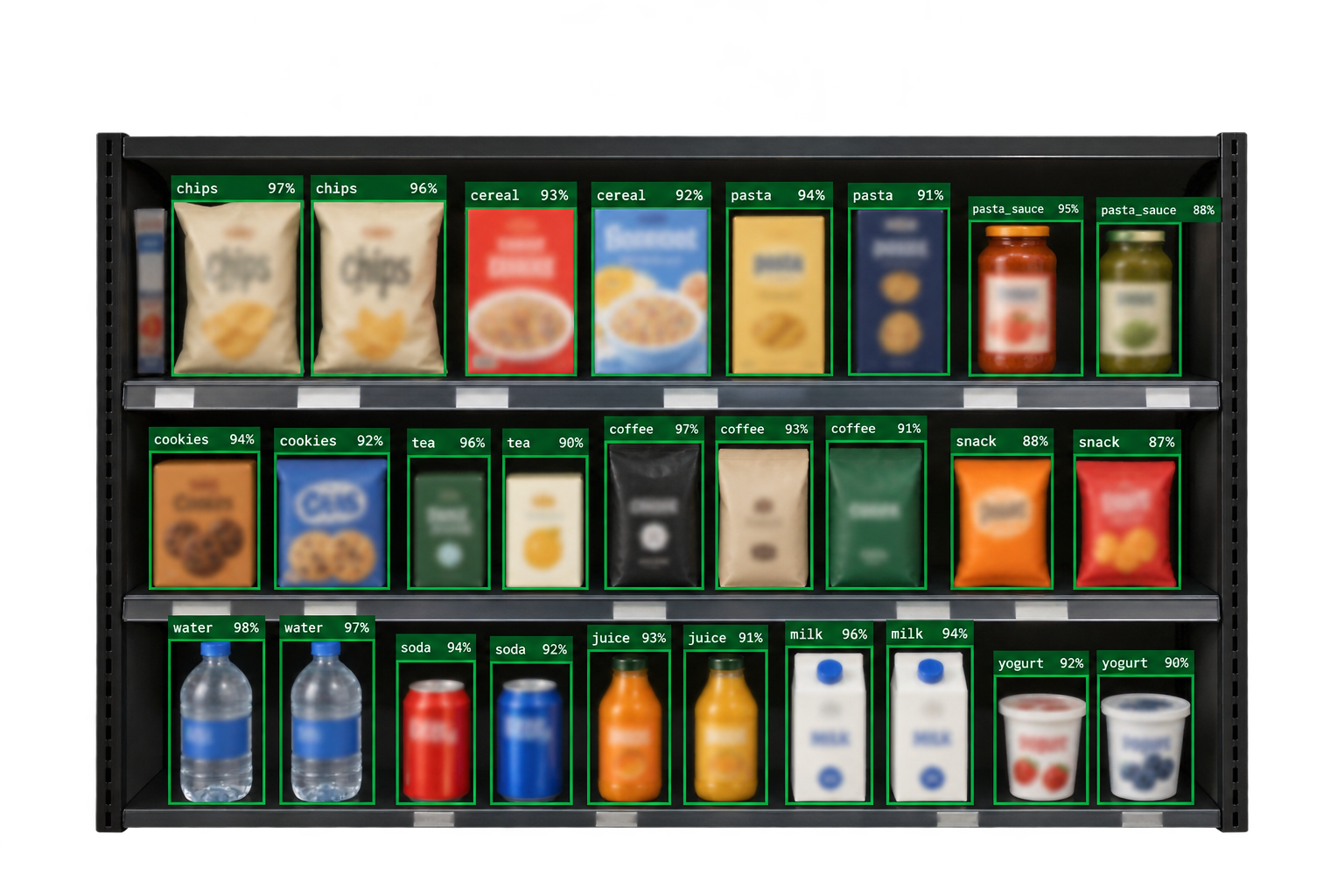
2.1 The Detection Pipeline
A store associate photographs a shelf section with a standard smartphone. The image is passed to Shelf-1, which runs a multi-stage detection pipeline: shelf segmentation identifies the bounding region of each shelf row, product detection identifies every facing within each row, price tag detection extracts the displayed price for each product, and inventory estimation counts the number of facings and identifies empty slots.22. Price tag detection is the hardest subproblem in the pipeline - format, placement, and legibility vary enormously across retail categories. See SKU-110K for a study of dense object detection on retail shelves.
The target is a full pipeline under 90 seconds on standard client hardware. No photo is transmitted to any external server: processing happens locally, and the deployed model is owned by the client, not licensed per call.
2.2 POS Integration
Computer vision alone tells you what is on the shelf. To tell you what matters, you need to connect what you see to what sold. Shelf-1 integrates directly with the client’s POS system to correlate the visual shelf state with real sales velocity. A facing detection becomes a revenue signal: this slot sells 40 units per day at $8.99, this slot sells 4 units per week at $3.49. Empty slot prioritization is revenue-weighted, not just count-weighted.
3. What We Expect to Learn From Pilots
Status: In development. Pilot programs are available; see the Shelf-1 page for the three-stage process.
One hypothesis we want to test: some mid-shelf positions show low sales velocity not because they are out of stock or misplaced, but because price tags have drifted down and are partly hidden by the shelf edge. Manual audits check for empty slots, not tag visibility, so this kind of condition is easy to miss.
This is the pattern we hope Shelf-1 can surface: not the obvious out-of-stocks that manual audits catch, but subtler conditions that are hard to see at scale by eye. Whether it does so is what pilots are for.
4. What’s Next
We are expanding Shelf-1’s training data to cover a broader range of retail categories and store formats. The current focus is standard grocery and consumer goods shelving; expansion to pharmacy, specialty retail, and warehouse club formats is in progress. We are also building a timeline analysis feature that tracks shelf state changes across consecutive audits, enabling restocking compliance and shrinkage detection.
Retailers interested in a pilot deployment can reach us at founders@generalmachines.ai. We run a structured three-stage process: a 30-minute live demonstration, a limited-store pilot against your own inventory data, and full deployment with on-premises installation.